Document Preprocessing Stages Before OCR
Sequence matters more than technique in document preprocessing for OCR accuracy.
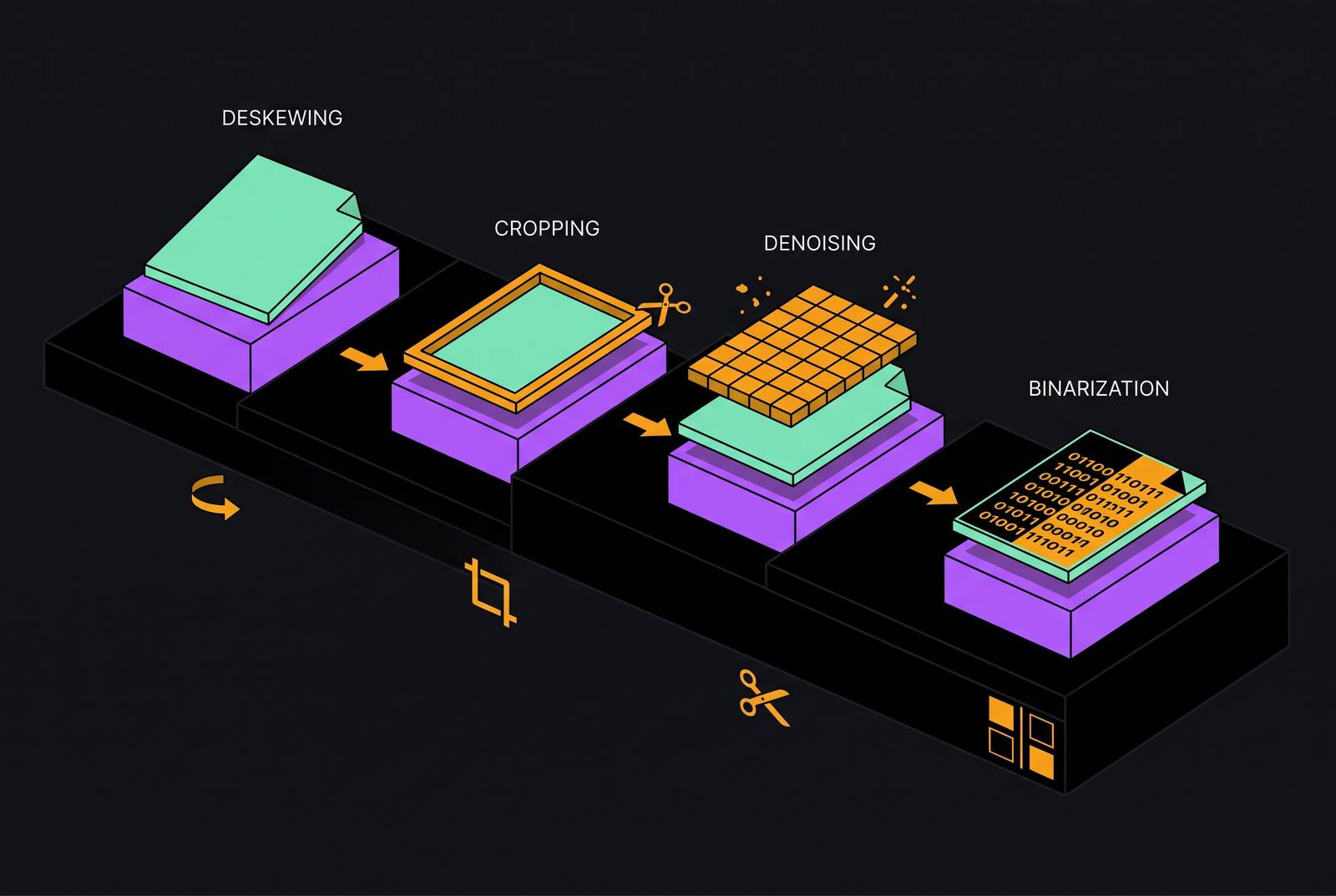
Preprocessing is usually described as a set of techniques: deskew this, binarize that, denoise the rest. That framing misses the actual structure. Document preprocessing before OCR is a sequenced pipeline where each stage depends on the one before it, and errors at any step compound into the next, directly degrading extraction accuracy. Order isn't a detail here. Order is the mechanism.
IQT's OCR pipeline overview treats preprocessing as the most crucial stage next to the OCR engine itself, placing it on equal footing with recognition rather than treating it as a warm-up step. That makes sense once you look at what real scanned documents actually arrive as. They show up with orientation problems, scanning deformations, and environmental noise, all of which need correction before any recognition engine has a chance of reading them correctly.
The stages that follow in this piece, detection, geometric correction, binarization, denoising, segmentation, aren't interchangeable modules you can run in any order based on convenience. Each one assumes the previous one already happened. If denoising runs before a skewed page has been straightened, the denoiser smooths over a distorted image, locking in artifacts instead of removing them. The rest of this piece walks through that order stage by stage, and the stakes aren't just "can a human read this page." The stakes are whether a field on an invoice, a number in a table, a label on a form, ends up attached to the right value once everything reaches the OCR engine.
Detecting whether a document is digital or scanned before any image processing begins
Before any pixel gets touched, a pipeline has to answer one question: is this document already text, or is it a picture of text? The first decision a document pipeline must make is whether a PDF contains a native text layer or is an image-only scan, because running OCR on a digital PDF wastes processing time and introduces errors that native text extraction would have avoided entirely.
Digital PDFs carry an embedded, selectable text layer. Scanned PDFs are image containers with nothing but pixels, no text underneath at all. If a digital PDF gets misclassified as a scan, it goes through image preprocessing and OCR anyway, and that introduces character recognition errors into text that was already perfectly machine-readable before anyone touched it.
This one classification choice sets the entire route a document will take. Digital PDFs go straight to native text extraction. Scanned PDFs enter the image preprocessing pipeline covered in the rest of this piece. Get the classification wrong, and a document ends up on the wrong path with no later stage positioned to catch it.
At the scale of a real document batch, skipping this gate has a measurable cost. Preocr's 2026 analysis found that detecting scanned versus digital PDFs before running OCR can cut compute usage by 40 to 70 percent. If a document got routed wrong, it produces errors that look like model failures but are actually routing failures, mistakes baked in before the OCR engine ever opened the file.
Geometric correction: why a crooked page damages everything downstream
Once a document is confirmed as a scan, the first thing to fix is its shape. Not its tone, not its noise, its shape. A page fed into a scanner at even a slight angle throws off everything that reads it afterward. Skew correction, deskewing, straightens that angle out, and the stakes are higher than they look: even a small angular offset causes OCR engines to detect merged words across lines that were actually separate on the original page.
Picture a line of text tilted by a few degrees. A segmentation step reading that page left to right doesn't see one clean horizontal line. It sees a line that drifts upward or downward across the page width, and depending on how steep that drift is, text from the line above or below starts bleeding into the same reading band. Words that were on separate lines get treated as one. Columns that were distinct get pulled together. None of that is a visual nuisance. It's a structural break that every later stage inherits.
Deskewing matters because it is what makes line detection, column segmentation, and table extraction coherent operations, not because crooked text looks bad. Running binarization or denoising on a page before it's straightened means those operations work against a baseline that's about to move. If geometric correction happens afterward, whatever pixel-level work was done beforehand gets partially undone or misapplied, because the geometry it assumed is no longer the geometry that exists.
Binarization: converting grayscale to black-and-white without destroying characters
Now that the page is properly aligned, the next stage converts it from grayscale into a clean two-tone image, pure black ink against pure white paper. Binarization sits right after geometric correction because it assumes a stable, undistorted page to begin with, and the thresholding method chosen here decides whether the characters on that page survive the conversion in one piece. IQT's pipeline lists binarization as one of the core preprocessing operations applied before OCR, alongside alignment correction and denoising.
Binarization is a lossy operation when the method is wrong for the page. A single brightness cutoff applied across an entire page works fine if the scan is evenly lit and has high contrast. It falls apart on a page with uneven lighting, a shadow across one corner, or a gradient from a badly lit scanner bed. Characters sitting in a darker region of the page get pulled down into pure black background and vanish. Characters in a washed-out region get pulled up into pure white and disappear the same way.
The ACL 2025 PreP-OCR pipeline treats this seriously enough to include Otsu binarization as one of the degradation-aware operations in its synthetic training data, which signals that binarization carries real consequences for output quality rather than functioning as a neutral format conversion. Once a thin serif, a decimal point, or a currency symbol gets crushed out of existence during this step, that pixel information is permanently gone. No denoising pass afterward and no post-OCR correction later can bring back a stroke that was never preserved in the two-tone image. The ceiling for everything downstream gets set right here.
Denoising: removing artifacts without removing characters
After binarization produces a clean two-tone image, the next job is clearing out whatever noise survived the conversion: speckling, faint background texture, stray marks picked up by the scanner glass or the camera sensor. Denoising has to come after binarization, because running noise reduction on a grayscale image first can change the exact pixel values binarization later depends on to separate ink from paper, and if denoising runs too aggressively after binarization, it strips out the fine strokes binarization was supposed to protect.
The PreP-OCR synthetic degradation pipeline applies random noise, Gaussian blur, stain overlays, and morphological operations in varying order, and it notes that different sequences produce meaningfully different results. Sequence changes the outcome. Technique alone doesn't.
Think about what happens when scanner or environmental noise, speckling, background texture, a faint line from a worn scanner bed, makes it all the way into the OCR engine's input. The recognition model doesn't know that texture isn't text. It tries to interpret it as characters anyway, and those phantom tokens corrupt whatever field extraction happens downstream.
Binarization and denoising fail in mirror-image ways. Binarization, done poorly, erases real strokes by crushing them into the wrong tone. Denoising, done too aggressively, erases those same fine strokes by mistaking them for noise, since a thin punctuation mark or a decimal point looks pixel-for-pixel identical to a stray artifact once the image is already reduced to black and white. Neither failure announces itself. Both just quietly remove information the OCR engine will never get back.
This same preparation pass usually includes one more step: DPI normalization, setting the image to a consistent resolution before it reaches the OCR engine. Too low a resolution and characters turn ambiguous blobs. But if it's too high, the pipeline burns processing time without gaining any accuracy. With resolution locked in, the image itself is done. What's left is figuring out what each part of that image actually represents.
Segmentation: teaching the pipeline where text regions, columns, and tables begin and end
Image quality is sorted out by this point, geometry corrected, tone converted, noise cleared, resolution normalized, and the next job is about structure rather than pixels. The pipeline needs to carve the page into its actual parts: text blocks, columns, tables, headers, embedded images, because feeding OCR the whole page as one flat image mixes unrelated content together and destroys the order in which it was meant to be read.
IQT's pipeline treats segmentation as its own major module, kept separate from preprocessing, and it has to identify regions of interest before the recognition engine ever runs.
The most common failure occurs in multi-column layouts. Without boundary detection between columns, an OCR engine reading straight across the full width of the page pulls text from two side-by-side columns into a single stream. That stream reads as grammatically plausible sentences, but it means nothing close to what either column actually said.
Tables carry the highest stakes of any segmentation failure. Cell boundaries, merged cells, and multi-level headers all need to be identified as structure before a single character gets recognized, because once a numeric value loses its connection to the column header above it, no correction step running after OCR can rebuild that association. A financial table where one header gets shifted a column over can cause a downstream system to pull the exact right number and attach it to the wrong field. No validation error gets triggered, because the number itself is perfectly plausible. It's just sitting under the wrong label.
You see the same failure pattern in retrieval systems built on top of OCR output. When segmentation fails upstream, flattened table rows and interleaved column text produce chunks that contain all the right words arranged in the wrong relationships, and a retrieval system will still return those chunks as strong matches, because word overlap looks like a match even though the structure underneath it is broken.
How errors compound across stages before OCR runs
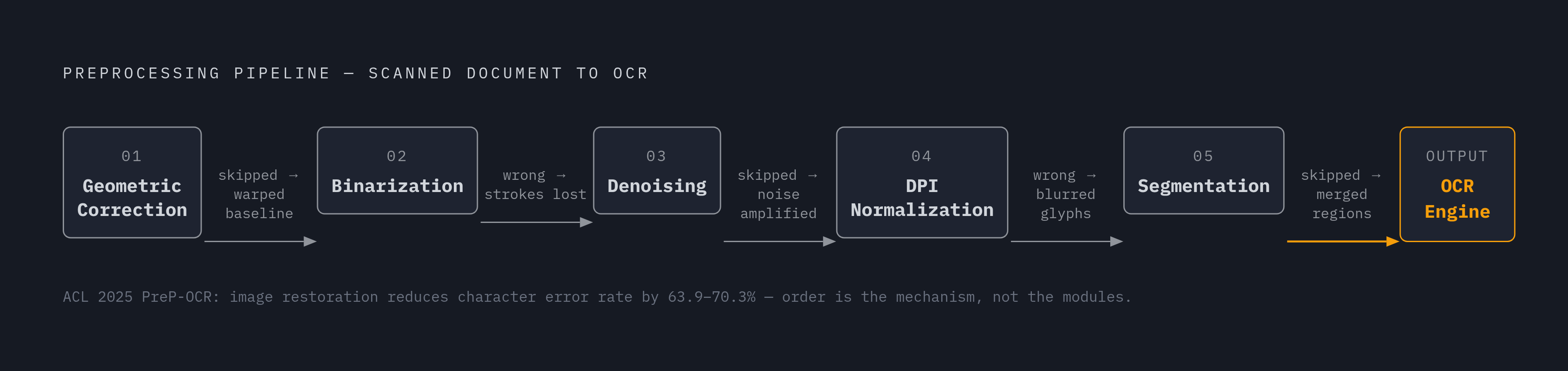
Everything up to this point has been building toward one conclusion: the final OCR output is only as good as the worst stage in the chain that produced it. An image that's been binarized correctly and denoised carefully will still produce systematic line-level errors if it was never properly deskewed, because the OCR engine takes the geometry it's handed as fact and has no way to question it.
The numbers back this up directly. The ACL 2025 PreP-OCR paper found that applying image restoration before OCR cuts character error rate by 63.9 to 70.3 percent compared to raw input, and adding semantic post-OCR correction on top of that reduces the error rate further still. Each stage adds its own improvement on top of the last, and pulling any single stage out doesn't just remove that stage's benefit, it degrades the entire output in a way that's disproportionate to the one piece that's missing.
The PureDocBench paper tested MinerU2.5-Pro, the highest-scoring pipeline specialist in its evaluation, against a real academic lab report and turned up three failures that no amount of preprocessing polish could have prevented: subscripts and superscripts came out garbled, with m³ rendered as m³3; arrow symbols inside sidebar annotations got converted into the wrong text entirely; and an entire block of student information disappeared from the output with no trace. Preprocessing sets the ceiling. If something gets lost or corrupted below that ceiling, no semantic correction layer running afterward can rebuild it from scratch.
Trace the failure chain at the level of a single field and the compounding becomes concrete. A skew error produces a line-merge error. The line-merge error produces a field-boundary error. The field-boundary error causes the OCR engine to attach the wrong value to the wrong label. And the resulting JSON output looks completely valid the entire way through. Nothing about the final structure signals that anything went wrong. The error is invisible precisely because it's syntactically clean.
Post-OCR correction as the last stage, not a substitute for preprocessing
Once OCR has produced its output, there's one more layer available: post-OCR correction, covering dictionary lookup, context-aware language validation, and business-rule checks. That layer can fix character-level mistakes, but it cannot rebuild structural information that preprocessing already lost.
Bill Tcheng's 2025 overview draws a clean line between these two layers. Preprocessing covers binarization, skew correction, denoising, border removal, and DPI normalization. Postprocessing covers dictionary-based correction, context-aware language validation, business rules, and machine-learning validation. Those are two separate jobs with two separate sets of responsibilities, and one can't stand in for the other.
The PreP-OCR paper's own post-correction model, built on ByT5, fixes semantic-level errors after OCR runs, but it's trained on the assumption that image restoration already resolved the pixel-level ambiguity upstream. When restoration falls short, the correction model's performance drops, because the errors it now faces stop following a learnable pattern and start looking diverse and unpredictable instead.
Certain failures simply sit outside what post-OCR correction can touch: columns lost to failed segmentation, entire sections dropped from the document, table rows merged into each other, field labels attached to the wrong values. Each of those needs structural information that only preprocessing could have preserved, and once OCR has already produced its output, that information is gone for good. Business-rule validation, say, checking that an invoice total matches the sum of its line items, can flag that a field-level error exists. It can't say which preprocessing stage caused it, and it can't go back and fix the source document.
The order matters because the damage is one-directional. Fix the geometry before the tone, fix the tone before the noise, fix the noise before the structure, so you build the recognition engine's input on a page that's actually sound. Skipping a stage or running it out of order means no amount of correction applied after the fact buys that accuracy back.
Sources
- PreP-OCR: A Complete Pipeline forDocument Image Restoration and Enhanced OCR Accuracy
- Text Extraction via Optical Character Recognition
- [Paper Note] PreP-OCR: A Complete Pipeline for Document Image Restoration and Enhanced OCR Accuracy
- How Far Is Document Parsing from Solved? PureDocBench: A Source-TraceableBenchmark across Clean, Degraded, and Real-World Settings