Table Extraction Techniques in Document AI Pipelines
Merges, nesting, and missing grids make tables the document AI problem most vendors don't solve.
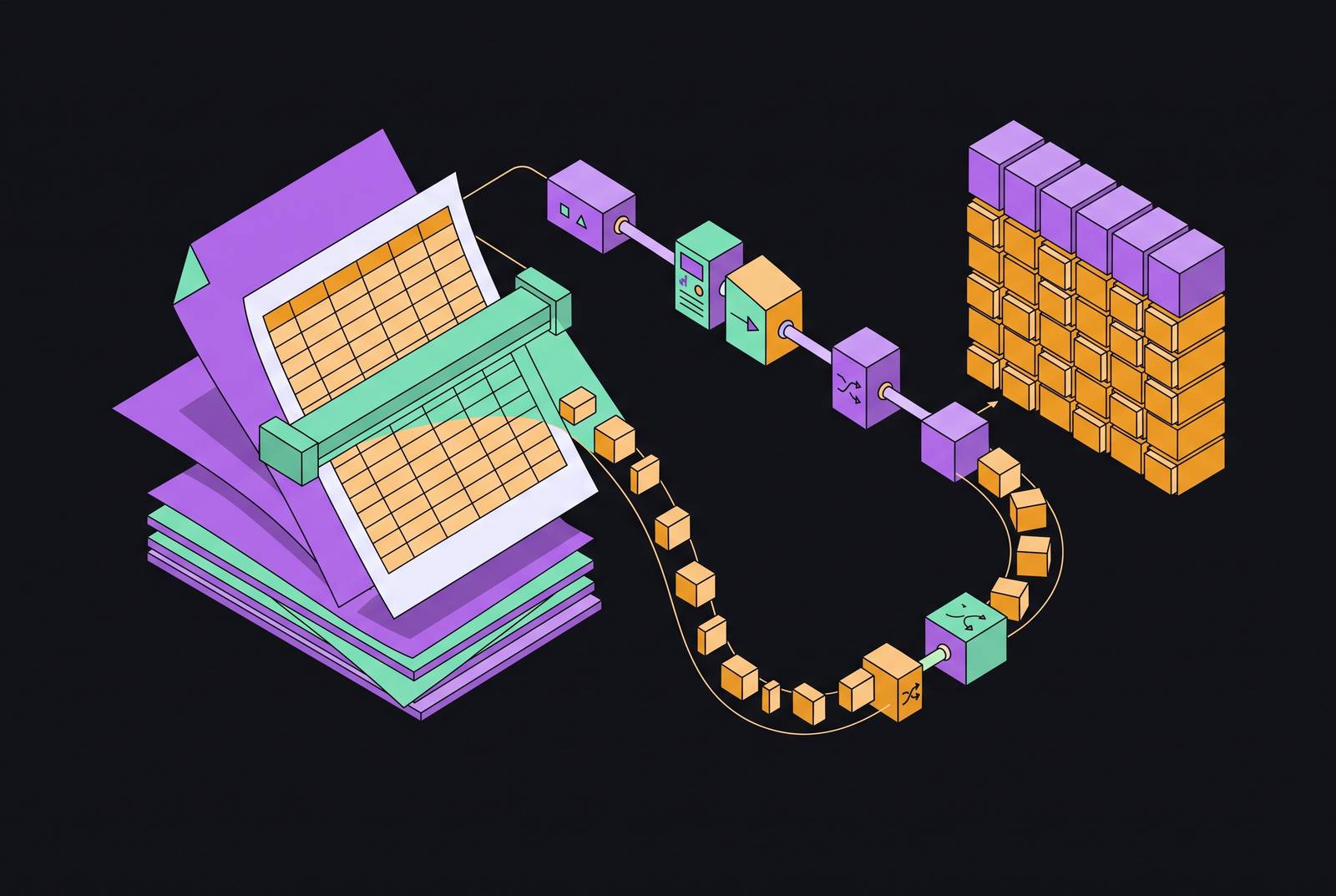
Table extraction is the single hardest structural problem in document AI, and it's the one most pipelines quietly get wrong. A misread character in a paragraph costs you one word. A misread table costs you an entire dataset, and it often fails without any warning sign at all.
Tables carry meaning across two axes at once. A number sitting in a cell means nothing until you know its row label, its column header, and sometimes the parent table it belongs to. Lose any one of those anchors and the value is wrong, even when every digit was read perfectly. That's what makes tables different from plain text, and it's why the industry keeps producing new techniques to deal with them rather than treating the problem as solved.
Real documents don't cooperate. Merged cells and spanning headers occur constantly, whether as colspan and rowspan attributes in HTML or as invisible merges buried in a PDF's layout. Tables get nested inside other tables: an invoice with line items broken out in a sub-table, a financial report where a summary row expands into a detailed breakdown inside what looks, structurally, like a single cell. Transaction logs and financial statements often run ten to twenty pages, with headers vanishing after page one and rows carrying on with no repeated context. And plenty of tables have no visible grid at all: no border lines, uneven column widths, and cells that mix plain text, numbers, and sub-tables together. Add scanned handwriting or a low-resolution image on top, and you've got the shape of the problem most vendors don't want to talk about.
The paper "Document Parsing Unveiled" (arXiv:2410.21169) reviewed roughly 130 different approaches to document parsing. It's a sign the problem draws a lot of research attention precisely because it hasn't been solved, and no single technique handles merges, nesting, multi-page spans, and borderless layouts all at once. The rest of this piece traces why, one failure mode at a time.
How traditional OCR and rule-based approaches fail on non-trivial tables
Traditional OCR reads a page the way a photocopier reads it: left to right, top to bottom, treating each region of text as its own island. There's no model of how one cell relates spatially to another. The engine has no concept of "row" or "column" at all, just characters sitting near other characters.
That gap appears first with merged cells. The OCR engine will happily read the text inside a merged cell, but it has no way to record which columns or rows that cell actually spans. What comes out the other end is a flat string with the structural context stripped away, and whatever consumes that output downstream has no way to know the cell wasn't just a normal, single-column entry.
Nested tables fare worse. Most OCR pipelines process each table as an isolated object, so a summary row and the detail breakdown living inside it get treated as unrelated. The parent-child relationship, the thing that actually gives the data meaning, gets severed at extraction time. What comes out is either incomplete or, worse, plausible-looking but wrong.
Multi-page tables break in a third way. A page boundary interrupts the table object entirely, and the parser loses its grip on column alignment across that break. Repeating header rows, the ones meant to remind a reader what column three actually means on page fourteen, become indistinguishable from ordinary data rows. A twenty-page transaction log turns into twenty disconnected fragments that some downstream process has to stitch back together, assuming anyone notices they were ever split.
Rule-based and coordinate-heuristic systems try to patch this by inferring cell boundaries from bounding boxes and detected lines. That works fine until the document doesn't match the expected grid geometry: a borderless table, a rotated scan, an embedded font that shifts character positions just enough to throw off the coordinates. What you're left with is regex-and-template logic that's brittle by design. A new vendor sends an invoice in a layout nobody's seen before, and the regex breaks. A handwritten field slips under the OCR confidence threshold. The manual review queue grows faster than any team can patch templates to keep up.
None of this is hypothetical. Embedded font handling is a documented failure mode: parsers can silently drop entire sections of a form without returning any error. Financial statements can come out with clean-looking text whose line breaks land mid-sentence, silently breaking every regex built to parse them downstream. Neither of these was some rare edge case pulled out to stress-test a system. These are the kinds of failures that appear early and often in real document pipelines.
That's the deeper engineering problem with rule-based systems. They can be tuned to pass whatever demo set a vendor shows a prospective buyer, but they degrade as real document variety increases, and the cost of maintaining them compounds over time. That tradeoff matters a lot when a team is deciding whether to build an in-house pipeline or buy one, a decision worth returning to once the available techniques are on the table.
The structural techniques that production-grade table extraction uses
Before a single cell gets read, a production pipeline has to run layout analysis: segmenting the page into regions and labeling each one as a text block, a table, a figure, or a header. Skip this step and a table's cells become indistinguishable from the paragraph sitting next to them. It's the prerequisite layer that everything else depends on.
Once a region is flagged as a table, structure recognition models take over. TableFormer, the model built into Docling, is designed for structure recognition, analyzing visual and positional features to understand table layout before character-level reading takes place. It prioritizes structural understanding of the table layout, with character-level reading following from that foundation.
Vision-language models take a different route. Instead of relying on coordinate heuristics, a vision-language model treats the page as an image and reasons about cell boundaries, merges, and reading order the way a person would, from visual context. That makes VLMs noticeably better at borderless tables, irregular grids, and rotated content, cases where rule-based coordinate logic tends to fall apart. The tradeoff is cost: VLMs are heavier to run, and on genuinely hard pages, dense text, low-resolution scans, or rare scripts, they can fall into repetition loops or produce text that looks plausible but was never actually on the page. ParseFixer (arXiv:2606.11977, 2026) addresses correction of such parsing failures in VLM-based pipelines.
Multi-page tables get handled through semantic chunking rather than physical page splitting. Instead of treating each page as its own object, the pipeline breaks the table into logical sections, tracks column alignment across the page break, and tells repeating header rows apart from actual data rows. The result downstream is one coherent table object instead of a pile of disconnected page fragments that someone has to reassemble by hand.
Nested tables need something closer to context engineering. LLM-powered pipelines can hold onto parent-child relationships during extraction in a way flat OCR never could, because traditional OCR simply flattens hierarchical structure the moment it hits a nested cell. A context-aware pipeline instead preserves the logical flow between the summary row and the detail rows sitting inside it.
Output format choice ends up mattering just as much as any of the above. Azure Document Intelligence's v4.0 layout API (GA as of November 2024) represents tables as HTML, which keeps colspan and rowspan semantics intact and lets a downstream LLM or RAG system parse the merge structure explicitly rather than guessing at it. Markdown, by contrast, is compact and easy to read but throws merge structure away entirely; a merged cell just turns into ambiguous whitespace. JSON with explicit row, column, and span fields is the most machine-readable option of the three, but it demands schema design work upfront. For any pipeline feeding an LLM or a retrieval system, this choice decides whether structural meaning survives into the prompt or gets lost before the model ever sees it.
A production pipeline generally needs three layers stacked on top of each other. First, prompting tuned for the structural demands of the document, telling the model how to handle irregular layouts and how to sequence what it finds. Second, post-processing that catches the edge cases even a well-prompted model still produces. Third, output structure enforcement: a schema defined before any document gets processed, so a failure appears as a visible error rather than a quiet, wrong value sitting in a field.
What the current benchmark landscape reveals about tool performance on real tables
Clean, well-formatted tables are, at this point, a solved problem. Every serious tool handles them fine. The differences that actually separate one tool from another are visible in merged cells, nested structures, borderless layouts, and tables that span multiple pages, which is exactly where most public benchmarks stop paying attention.
LlamaParse builds its approach around layout-aware semantic reconstruction, multimodal parsing for charts and formulas, and agentic orchestration with auto-correction loops built in. Its v2 parse API added tier-based configuration (Fast, Cost Effective, Agentic, Agentic Plus), support for GPT-4.1 and Gemini 2.5 Pro, automatic orientation and skew correction, and confidence scores at the field level. It's a strong fit for complex enterprise paperwork feeding RAG pipelines: financial statements, invoices, healthcare forms, legal contracts, insurance claims. The tradeoff is that the more advanced agentic and VLM-driven tiers depend on cloud connectivity, and the heavier processing modes take noticeably longer than a lightweight OCR pass would.
Docling takes a different path, built around TableFormer for structure recognition and hierarchical layout analysis, and it runs well on local hardware. It can detect 59 distinct document sections with hierarchy levels attached, and it renders bounding boxes that separate text, tables, and pictures cleanly. It's mainly a self-hosted, open-source framework rather than a plug-and-play API, so it asks more of the engineering team setting it up. Where it shines is scientific paper parsing, ESG and sustainability report extraction, and any workflow where documents can't leave the building, with TableFormer doing much of the heavy lifting on scientific and financial tables specifically.
Azure Document Intelligence's layout API, GA since November 2024, outputs Markdown but represents tables internally as HTML, specifically so merged cells and multirow headers render properly. It ships with pre-built models for invoices, identity documents, and complex tax and corporate filing tables, and the Markdown output was built with AI, LLM, and RAG ingestion in mind. Being an enterprise API tied to the Azure ecosystem, custom training adds complexity and cost that a smaller team may not want to take on.
Google Cloud Document AI analyzes tabular structure to pull out column headers, row values, and individual cells, and its Form Parser handles key-value pairs, checkboxes, tables, and eleven generic entity types together. Through 2025 it kept improving layout understanding for complex multi-page and deeply nested tables, and it offers specialized parsers built for mortgage processing, procurement automation, and legal contract analysis. The cost is added complexity around pricing and integration for teams not already living in Google Cloud.
PyMuPDF and its lightweight extension PyMuPDF4LLM take a completely different approach: fast, CPU-based text-layer extraction for digital PDFs, with recent updates improving formatting for LLM ingestion specifically. Table fidelity is limited for complex structures, so it's the right tool when speed is the priority over structural accuracy, not when the table's shape is the point.
The open-source, self-hosted field has moved fast. MinerU 2.5-Pro, at a fraction of the size of much larger models, scored 95.69 on OmniDocBench v1.6, beating much larger models, a result driven by substantially expanding its training data from 10M to 65.5M samples rather than any architecture change. OlmOCR-2, released by the Allen Institute for AI in October 2025 and built on Qwen2.5-VL-7B-Instruct, scored 82.4 (plus or minus 1.1) on olmOCR-Bench, with its models and code released as open source. DeepSeek-OCR packs a small total parameter count with only a fraction of those parameters active into a mixture-of-experts decoder, with a DeepEncoder vision system that compresses document images by a large multiple, trading a bit of speed for real cost savings on the same GPU. PaddleOCR-VL-1.6, Apache 2.0 licensed at approximately 0.9B parameters, runs at about 45 pages per minute on an L40S. Granite-Docling, at 258M parameters and licensed under Apache 2.0, is noted for its efficiency in self-hosted deployments. GOT-OCR 2.0 holds up well on equations while staying under 3GB of VRAM.
No single tool wins across merges, nesting, multi-page continuity, and borderless layouts at once. Picking one means matching it to whichever document type and failure mode dominates a given pipeline, and that's exactly why benchmark headlines matter less than the evaluation method behind them.
Why accuracy claims don't mean what vendors say they mean, and how to measure table extraction properly
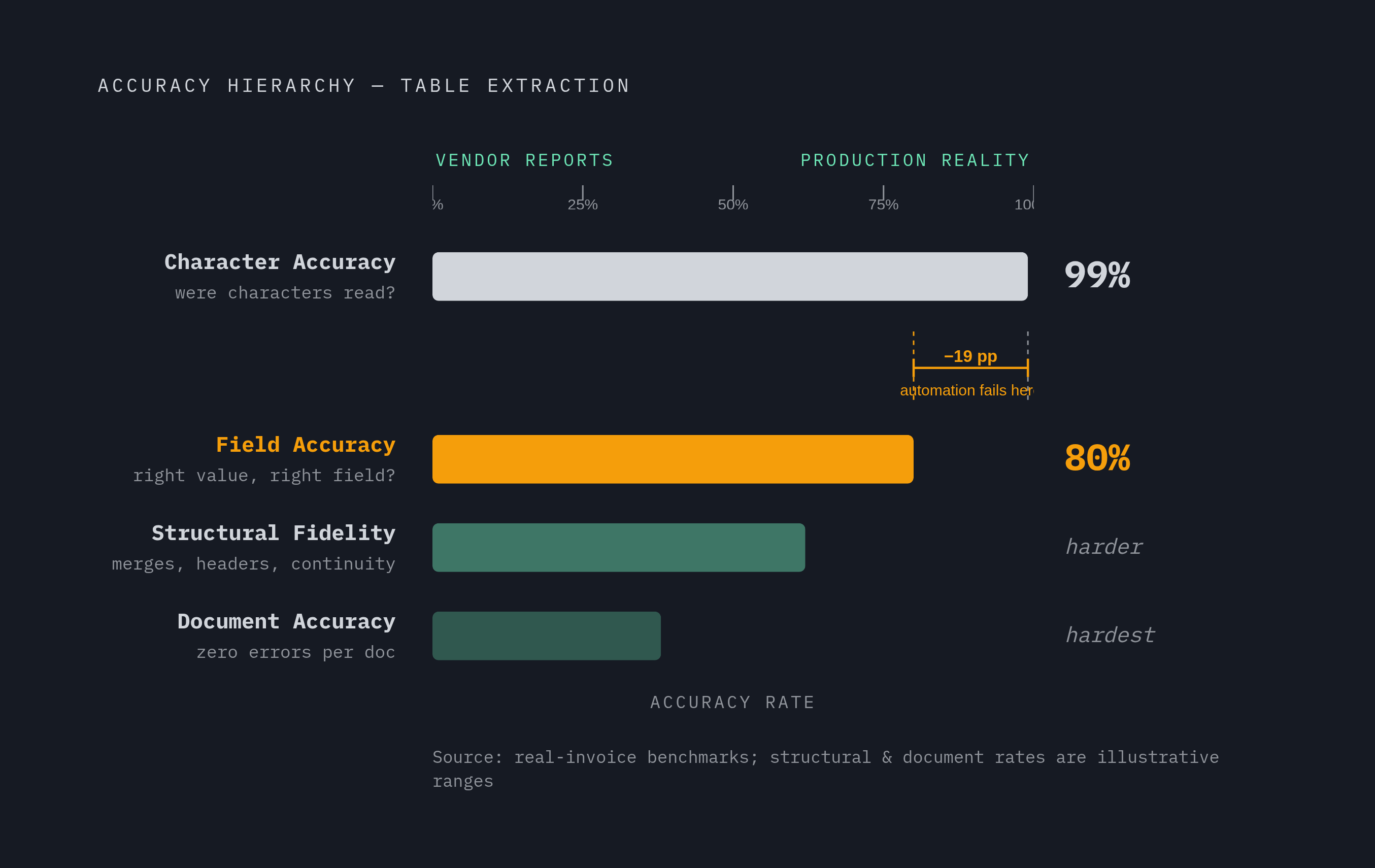
A vendor claiming "99% accuracy" is almost always reporting character accuracy, and character accuracy tells you almost nothing about whether the table data coming out the other end is actually right.
There's a hierarchy of metrics that matters far more for tables than the single number vendors like to lead with. Character accuracy asks whether each character got read correctly, which is a measure of OCR quality and nothing more. Field accuracy asks whether the right value landed in the right named field, and that's the number that actually decides whether a downstream system gets fed correct data. Structural fidelity asks whether merged cells, hierarchical headers, and cross-page continuity survived the extraction, and it's the dimension most vendor benchmarks skip over entirely. Document accuracy asks what share of documents came through with zero errors at all, and that's the figure that determines how much of a workflow can actually run without a human checking it.
A tool boasting 99% character accuracy can easily be at 80% field accuracy on real invoices, and that 15 to 20 percentage point gap is where a lot of production automation quietly falls apart. ParseBench, a 2026 benchmark, built a Tables dimension specifically to measure structural fidelity around merged cells, hierarchical headers, and cross-page continuity, because a single shifted header or a mishandled merge is exactly the kind of error that causes an agent in a financial workflow to pull the wrong number and never flag it.
A more honest way to aggregate accuracy is something like Weighted Overall Accuracy (WOA), a weighted average of per-field similarity scores across every entity type, where string fields get scored with normalized Levenshtein similarity, numeric fields get a tolerance-based comparison, and every field ends up with a continuous score between 0 and 1 rather than a binary pass or fail. This approach comes out of the ConfBench work (arXiv:2608.01792, August 2026), and it's a meaningfully better way to talk about accuracy than a single flat percentage.
None of these numbers mean much unless they're measured across the actual range of conditions a pipeline will face: digital PDFs versus scans, skew and noise, stamps and handwriting, different languages, and supplier templates the system has never seen before. A benchmark built entirely on clean, well-behaved documents tells you almost nothing about how the system behaves on the document that actually breaks it.
Confidence calibration deserves the same scrutiny. A model that claims 95% confidence but is only right 72% of the time makes threshold-based automation impossible, because the confidence score stops meaning anything a team can act on. A practical check: pull 100 extractions the system marked above 0.90 confidence and verify them by hand. If more than 10% contain errors, the confidence scores are miscalibrated and shouldn't be trusted to gate automation decisions. The EXTRACTCONF system (arXiv:2606.24420) shows what good calibration buys: at 80% coverage it reaches 99.1% automated accuracy, a 25.8 percentage point jump over its 73.3% base rate. Numeric fields tend to calibrate well, while free-text fields show overconfidence at high predicted probabilities, which matters directly for table cells that mix numbers and prose in the same column.
Accuracy scores alone don't capture what a business actually cares about. Straight-through processing rate, manual review rate, and false auto-approval rate are the numbers that reflect real automation effectiveness and real operational risk in a live table extraction workflow. Building an honest evaluation means pulling 50 to 100 documents from the actual production corpus and making sure the edge cases are included.